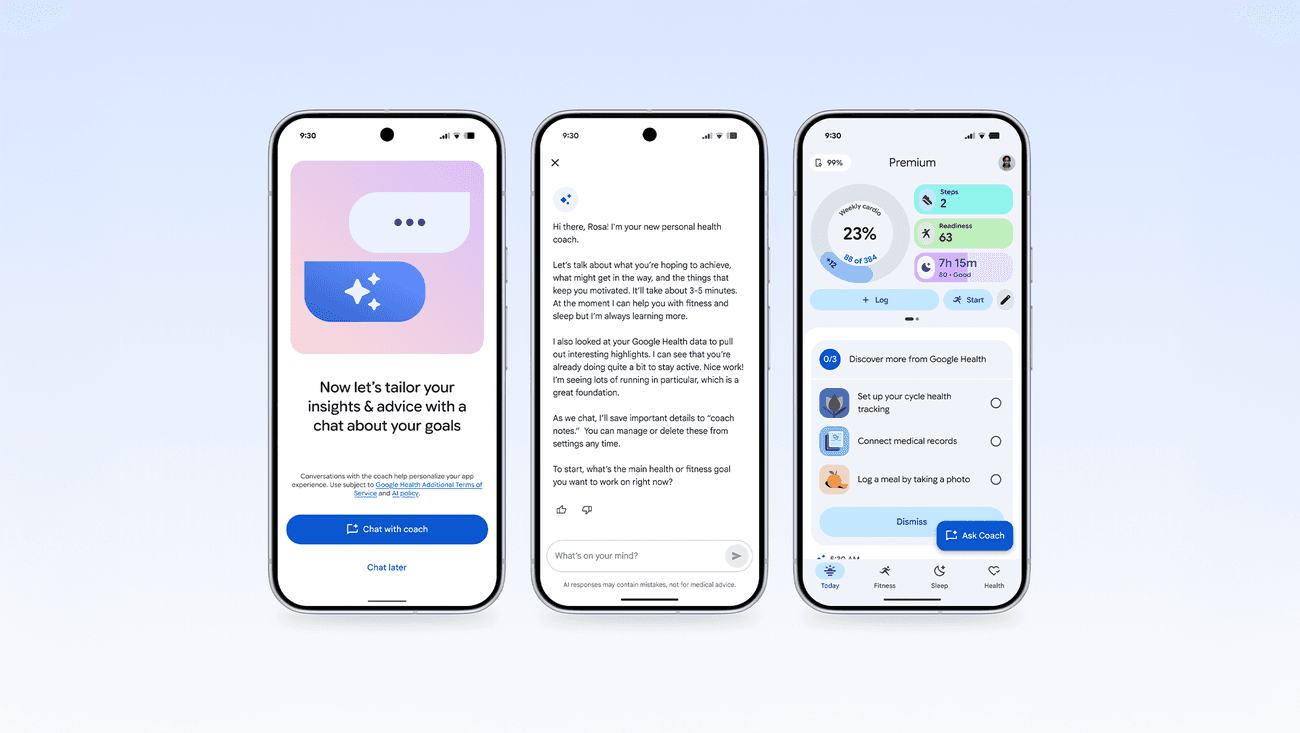
Health apps are becoming dashboards for everything: sleep, stress, strain, readiness, workouts, food, glucose, cycle tracking, medical records and AI coaching. The problem is not too much data. The problem is too little hierarchy.
A good health dashboard should answer one question quickly: what should I do next? If it cannot do that, it is not a coach. It is a filing cabinet with a subscription.
What changed
Google is turning Fitbit into the Google Health app, with a broader hub for fitness, sleep, health metrics, records and AI coaching. Oura is adding meal and glucose context. Garmin has Connect+ and Active Intelligence. WHOOP has AI coaching and healthspan-style metrics.
Every platform is trying to be the place where your body data makes sense. That is understandable. The trouble starts when every metric wants top billing.
Why clutter happens
Health apps have three competing jobs. They need to show today's data, prove the subscription is worth paying for, and push the next feature. Those goals are not always aligned with your needs.
You may need the boring answer: sleep earlier, take an easier day, eat more protein, go outside, or stop training through pain. The app may want to show a colourful stack of insights because colourful stacks look premium.
What should be on the first screen
The first screen should show fewer things, not more. It should show your key status, the one or two metrics that changed meaningfully, and the most useful next action. If everything is important, nothing is.
For most people, that means sleep consistency, training load, resting heart rate trend, upcoming workout, and one simple behaviour prompt. It does not mean 12 tiles arguing for your attention before coffee.
What should be buried deeper
Detailed sleep stages, HRV history, glucose overlays, oxygen saturation, skin temperature, pace-of-aging estimates and meal tags can be useful, but they should not dominate the daily view unless they require action.
A dashboard should treat advanced metrics like a toolbox. Useful when needed. Annoying if dumped on the floor every morning.
AI summaries can help or hide
AI summaries are promising because they can compress multiple signals into plain language. They are also dangerous when they sound confident without showing uncertainty.
The best AI health summary says what changed, why it might matter, and what simple action to test. The worst one turns normal variance into drama.
How to judge your app
Ask whether the app helps you act more consistently. If it makes you check more often but change less, it is probably entertainment. If it helps you plan training, protect sleep, notice trends and ignore noise, it is doing its job.
Also ask whether the app explains data limits. Sleep stages, readiness, HRV, calorie burn and stress estimates are not lab measurements. A good app admits that.
Bottom line
Health apps should make the next useful action obvious. The more they become AI-powered health control centres, the more they need restraint.
Your dashboard does not need to know everything about you. It needs to stop making the obvious hard.
FAQ
Why do health app dashboards feel overwhelming?
Apps are trying to show sleep, stress, strain, glucose, meals and AI advice all at once. When every metric wants top billing, nothing has hierarchy.
What should a good dashboard answer first?
One question: what should I do next? For most people that means sleep consistency, training load, resting heart rate trend and one simple behaviour prompt.
Which metrics belong deeper in the app?
Detailed sleep stages, HRV history, glucose overlays, skin temperature and pace-of-aging estimates are useful on demand, not as daily headline tiles.
Can AI summaries help?
They can compress signals into plain language, but confident summaries without uncertainty are risky. The best ones say what changed, why it might matter, and what simple action to test.
How do I judge whether my app is working?
If it helps you act more consistently on sleep and training, it is doing its job. If you check more often but change less, it is probably entertainment.
Sources
- Google: Introducing the Google Health app
- Google Health Coach
- Garmin Connect+ announcement
- Oura glucose tracking support
- WHOOP membership
- Which fitness tracker numbers are real?
- Habit stacking explained
Spot an error or have a product we should test? We read every note.
Get in touch